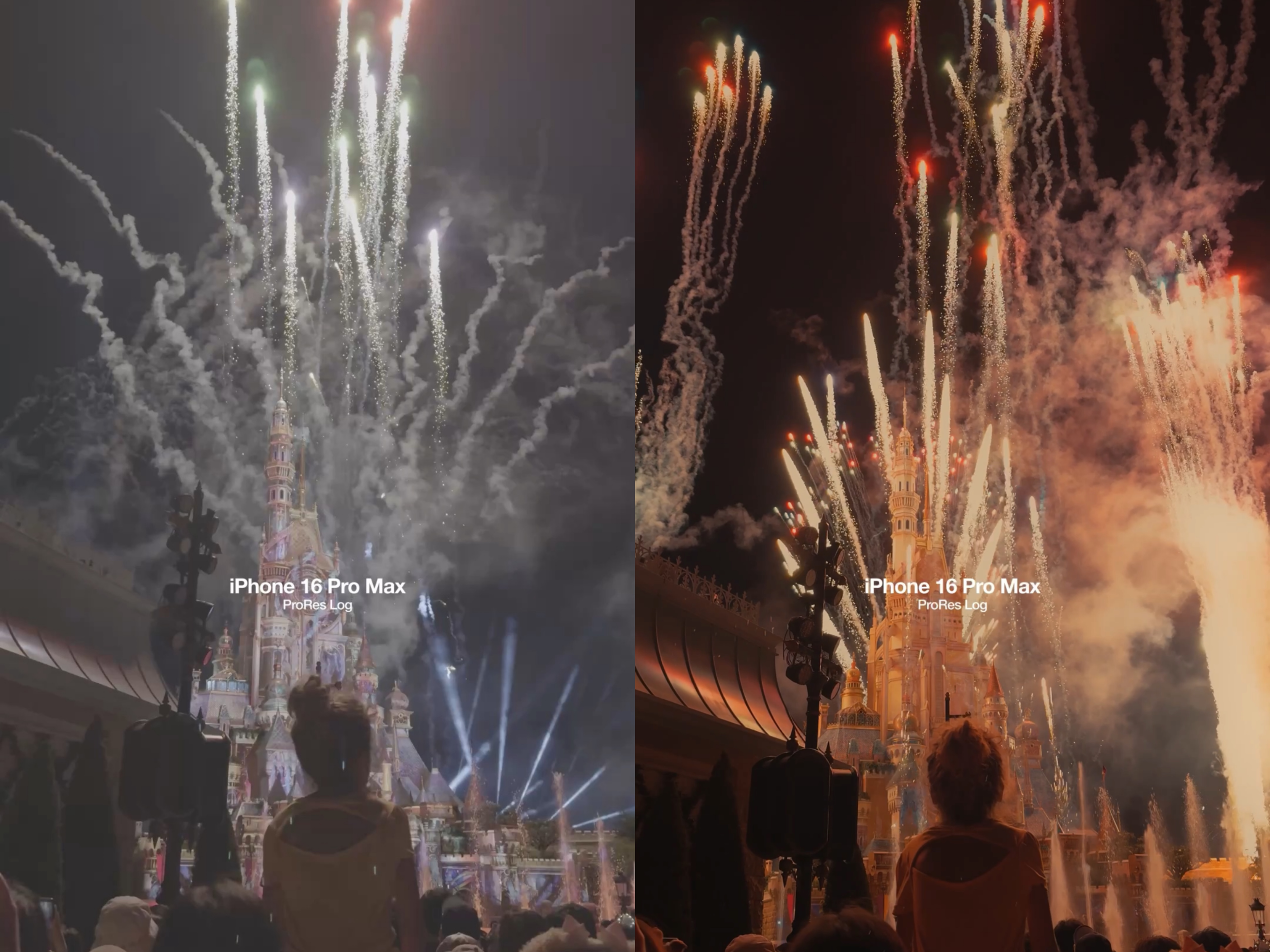

In the fast-evolving world of digital filmmaking, one term keeps making waves among professionals and enthusiasts alike: Apple ProRes.
If you’re a professional videographer or even an aspiring content creator looking to elevate your video game, you’ve probably heard of ProRes.
But what exactly is it, and why is it considered so good?
In this guide, we’ll dive deep into what Apple ProRes is, why it matters, and how it can transform your video production process.
Whether you’re shooting a documentary, commercial, wedding film, or cinematic content for social media, understanding ProRes could be the next step in taking your work to professional levels.
Table Of Contents
What Is Apple ProRes?
Apple ProRes is a high-quality video codec (short for “compressor–decompressor”) developed by Apple.
A codec essentially compresses video files so they’re manageable in size without losing too much quality.
Most consumer video formats, like H.264 or HEVC, are designed to shrink file sizes for easier sharing and playback.
While that’s great for streaming or storing on your phone, it’s not always the best for professional editing. These formats often compromise detail and color data.
Apple ProRes, on the other hand, is designed for post-production. It offers high image quality with manageable file sizes, striking the perfect balance between efficiency and fidelity.
Why Apple ProRes Is Good for Videographers
1. Exceptional Video Quality
ProRes captures more detail, better color accuracy, and smoother gradients than typical recording formats.
This means your footage holds up even when you push it during editing, whether you’re color grading, adding effects, or compositing.
For videographers, this level of detail is crucial.
If you’ve ever tried to brighten a dark scene or adjust skin tones only to find the video breaking apart with noise and artifacts, you’ll appreciate the robustness of ProRes.
Also Read: Ultimate 2025 Guide to Camera Memory Cards: Fast, Reliable & Budget-Friendly Options
2. Ideal for Professional Editing
ProRes is known as an edit-friendly codec.
Unlike compressed formats like H.264, which demand heavy processing power to decode, ProRes is optimized for smooth playback in editing software like Final Cut Pro, Adobe Premiere Pro, and DaVinci Resolve.
That means fewer dropped frames, faster scrubbing through timelines, and smoother previews. Videographers working under deadlines benefit greatly from this efficiency.
3. Preserves Color Depth and Dynamic Range
Professional videography often involves shooting in challenging lighting conditions. ProRes supports high bit depths, which means it retains subtle differences in color and brightness. This is especially important if you shoot in HDR (High Dynamic Range) or want cinematic looks.
Instead of crushed blacks or blown-out highlights, ProRes footage gives you more room to adjust in post without losing image quality.
4. Better for Multi-Generation Editing
Every time a compressed video file is re-encoded, it loses some quality. This isn’t noticeable after one or two edits, but in a professional workflow involving multiple revisions, it adds up quickly.
ProRes was designed to minimize this issue. It maintains quality across multiple editing and exporting cycles, making it reliable for collaborative projects and long-term archival.
5. Future-Proof for Content Creators
The demand for high-quality video is rising on every platform. From YouTube and Instagram Reels to Netflix and cinema screens, viewers expect crisp visuals.
Shooting in ProRes ensures your content is future-proof, ready to be distributed across platforms without looking outdated.
If you’re an aspiring filmmaker or content creator, learning to use ProRes from the start sets you apart from hobbyists.
Apple ProRes on iPhone: A Game Changer
When Apple introduced ProRes video recording on the iPhone 13 Pro and later models, it bridged the gap between consumer devices and professional tools.
Suddenly, creators could shoot broadcast-quality video on their smartphones.
This move was revolutionary for videographers who needed portability without sacrificing quality.
Imagine filming behind-the-scenes content, short films, or even client projects using just your iPhone—then editing seamlessly in ProRes.
While ProRes files are larger, the benefit of having professional-level footage right in your pocket is unmatched.
Apple ProRes vs. Other Formats
ProRes vs. H.264/HEVC
H.264 and HEVC are great for streaming and storage because they produce smaller file sizes, but they are heavily compressed.
ProRes files are larger but deliver higher quality and a much better editing experience.
ProRes vs. RAW
RAW offers maximum quality and flexibility but comes with enormous file sizes and demanding hardware requirements.
ProRes, while slightly compressed, is far more practical and provides an excellent balance of quality and efficiency.
For most videographers, ProRes hits the sweet spot between convenience and professional-grade output.
Who Should Use Apple ProRes?
Professional Videographers
If you shoot weddings, events, commercials, or corporate videos, ProRes ensures your footage is polished and flexible for editing.
Aspiring Filmmakers
Learning to work with ProRes early on prepares you for industry-standard workflows. It’s an investment in your future skillset.
Content Creators and Influencers
Social media algorithms favor high-quality visuals. Shooting in ProRes helps your content stand out on platforms like YouTube, Instagram, and TikTok.
Production Houses and Agencies
For large projects requiring collaboration and multiple edits, ProRes reduces the risk of quality loss across revisions.
Downsides of Apple ProRes (and Why They’re Worth It)
No technology is perfect, and ProRes does have its challenges.
File size is a big one. ProRes files are significantly larger than compressed formats. You’ll need plenty of storage, both on set and for long-term archiving.
Hardware requirements are another factor. Editing ProRes smoothly requires decent processing power and disk speed.
Battery impact is noticeable on iPhones. Shooting in ProRes drains more battery compared to standard formats.
But for professional results, these trade-offs are worth it. Most videographers already invest in external hard drives and powerful editing setups, so the benefits outweigh the drawbacks.
How to Start Using Apple ProRes

On iPhone, enable ProRes in your Camera settings under “Formats.” Just make sure you have enough storage space.
You can shoot Log video in 1080p right on your iPhone but for shooting 4k you need to attach an external hard drive.
I use this one. It’s pretty small and easy to carry.
On professional cameras, many cinema cameras such as ARRI and Blackmagic natively support ProRes recording.
For editing workflow, import footage directly into your editing software, and you’ll notice smoother playback and faster rendering times compared to H.264.
You can colorgrade the ProRes videos on DaVinci Resolve.
I have made a set of cinematic LUTs you can use to colorgrade them.
The Future of Apple ProRes
With the growth of mobile content creation and hybrid workflows, Apple ProRes is likely to become even more widespread.
Apple continues to optimize ProRes for its hardware ecosystem, ensuring seamless integration between iPhones, Macs, and professional software like Final Cut Pro.
For videographers, this means easier access to professional-quality recording without investing in prohibitively expensive cinema cameras.
Final Thoughts
Apple ProRes isn’t just another video format. It’s a professional tool designed to give videographers maximum flexibility, quality, and efficiency.
For professional videographers, ProRes delivers reliable performance, stunning visuals, and a smoother editing workflow. For aspiring filmmakers, it’s a chance to learn industry-standard practices early on, setting the stage for a successful career.
If you’re serious about video production, embracing Apple ProRes is one of the best decisions you can make.

Subscribe to never miss a post!
Leave a Reply