
If you run a WordPress website in 2025, you’ve probably heard about Rank Math WordPress SEO Plugin.
It’s one of the most popular SEO plugins out there, competing directly with Yoast SEO.
But is it worth it in 2025?
Let’s break down its features, benefits, setup process, and whether it deserves a spot in your WordPress toolkit.
Table Of Contents
What is Rank Math WordPress SEO Plugin?

It is a WordPress plugin designed to help your website rank higher in search engines like Google and Bing.
Think of it as your SEO assistant: it analyses your content, suggests improvements, handles technical SEO tasks, and ensures your site follows the latest SEO best practices.
Unlike other plugins, it combines multiple features into one lightweight tool.
Instead of installing separate plugins for redirections, schema markup, XML sitemaps, and keyword optimisation, it gives you all these features under one roof.
Why This WordPress SEO Plugin Stands Out in 2025

SEO is constantly changing. Google updates its algorithms regularly, and staying on top of these changes is crucial. Here’s why Rank Math remains a favourite in 2025:
- AI-Powered Content Optimisation – It’s Content AI suggests keywords, questions, and related terms to improve your content.
- Lightweight and Fast – Unlike bulky plugins, it doesn’t slow down your site.
- More Features for Free – While competitors like Yoast lock key features behind a paywall, Rank Math’s free version covers almost everything a beginner needs.
- Schema Markup Made Easy – It helps you add structured data (like FAQs, recipes, events) to your site with a single click.
- Built-in Analytics – See traffic stats, rankings, and indexing status right inside your WordPress dashboard.
Also Read: 10 Essential WordPress Plugins You Must Have in 2025
Key Features of Rank Math SEO
Here are the standout features that make it one of the top SEO plugins for WordPress:
1. On-Page SEO Analysis
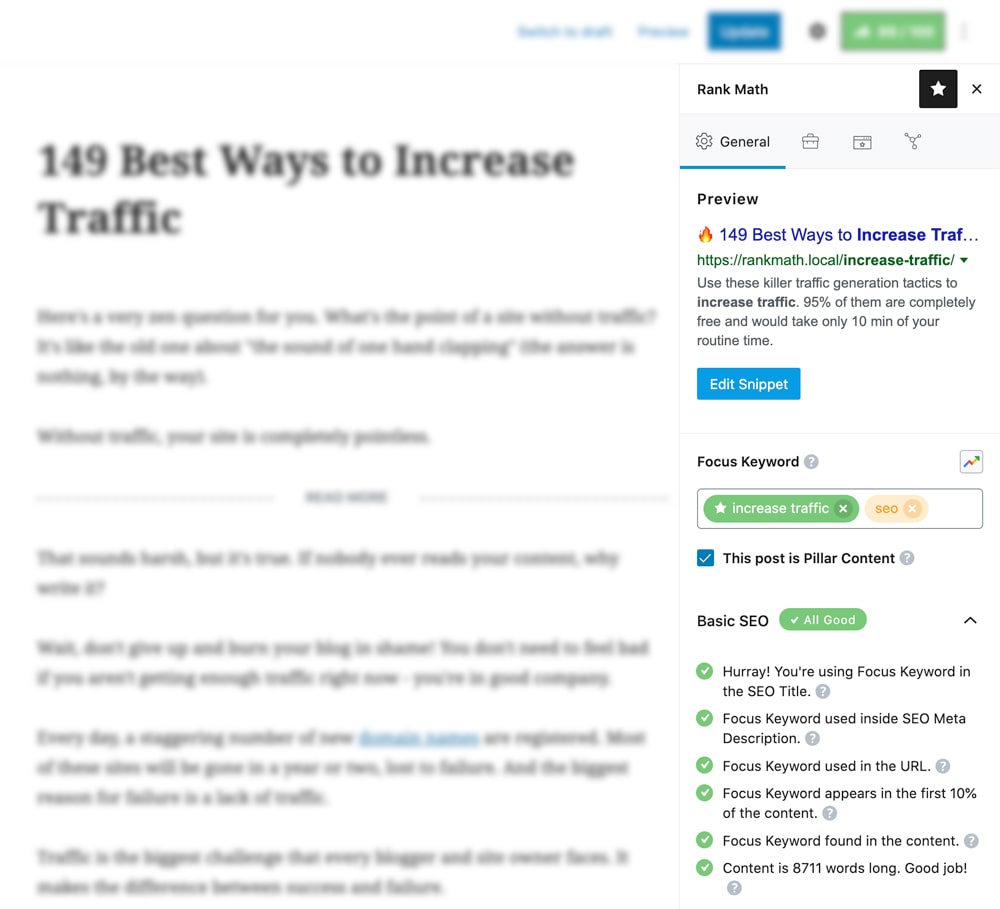
When you write a post, it gives you an SEO score and checklist. It checks for:
- Keyword placement (in title, headings, meta description, URL)
- Readability improvements
- Image alt text
- Internal and external linking suggestions
2. Advanced Schema Markup
Schema markup helps Google understand your content better. It lets you add schema for:
- Articles
- FAQs
- Products
- Events
- Recipes
- Reviews
This increases your chances of appearing in rich snippets, which can boost click-through rates.
3. Keyword Tracking
With the Pro version, you can track how your keywords are performing directly from your dashboard. This saves time compared to using external tools.
Also Read: AI Search Optimization: The Future of SEO (And Why You Must Right Now)
4. XML Sitemap
It automatically generates a sitemap for your site, helping search engines index your pages faster.
5. Redirection Manager
If you delete or move a page, you can set up 301 redirects easily. This prevents broken links and keeps your SEO intact.
6. WooCommerce SEO
If you run an online store, it optimises product pages with better titles, meta descriptions, and product schema.
7. Google Integration
Rank Math connects with Google Search Console and Google Analytics so you can view data directly in WordPress.
Also Read: Long Tail Keyword Examples Broken Down In The EASIEST Terms
Here’s The Setup Guide
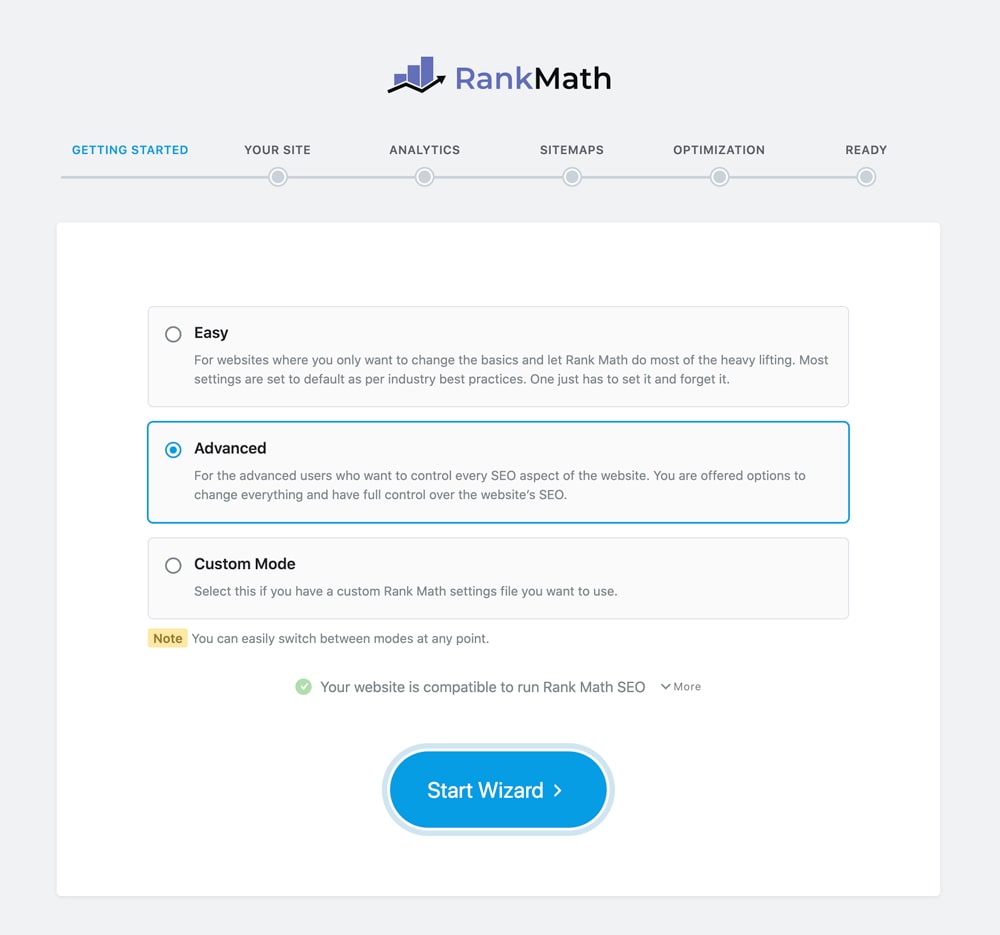
One of the best things about it is how easy it is to set up. Here’s a quick guide:
Step 1: Install the Plugin
Go to Plugins → Add New in your WordPress dashboard, search for Rank Math SEO, and click Install → Activate.
Step 2: Run the Setup Wizard
It will guide you through an easy setup wizard where you:
- Connect your Rank Math account (free to create)
- Enter your site details (blog, business, e-commerce, etc.)
- Connect to Google Analytics and Google Search Console
- Enable sitemaps
- Choose which schema you want as default (e.g., Article, Blog, Product)
Step 3: Configure Titles and Meta
Set default patterns for titles, descriptions, and social sharing. This ensures consistency across all pages.
Step 4: Enable Modules
It comes with modules like redirection, 404 monitor, schema, and WooCommerce SEO. You can enable or disable them as per your needs.
Step 5: Optimize Your Content
When you create a new post or page, use the SEO checklist. Aim for a score of 80+ for strong optimisation.
When you first install Rank Math SEO plugin, it gives you three setup modes so you can choose how much control you want:
- Easy Mode – Best for beginners. Rank Math automatically applies the recommended SEO settings, so you don’t have to worry about technical details. Perfect if you just want quick optimization without spending much time.
- Advanced Mode – Ideal for bloggers, content creators, and website owners who want more control. This mode unlocks detailed options like meta tags, sitemaps, redirects, rich snippets, and more.
- Custom Mode (Pro users) – Designed for agencies or power users managing multiple client websites. It allows full flexibility with import/export of settings, role manager, and deeper integration with advanced SEO features.
👉 Pro tip: If you’re just starting out, go with Easy Mode, and later switch to Advanced Mode once you’re comfortable. You can change modes anytime in the settings.
Also Read: Start Affiliate Marketing To Make EXTRA Bucks Through Your Blog Right NOW!
Free vs Pro: Which One Should You Choose?
Free version is already more powerful than most other SEO plugins. It covers on-page optimisation, sitemaps, schema, and redirection.
However, if you’re serious about SEO, the Pro version is worth considering. Here’s what you get:
- Keyword rank tracking
- Content AI suggestions
- Advanced WooCommerce SEO
- More schema types
- Google Trends integration
- Unlimited website support (with higher plans)
For beginners, the free version is enough. For businesses, e-commerce sites, and bloggers looking to scale, the Pro version offers excellent value.
Pros and Cons of Rank Math SEO
Like any tool, Rank Math has its strengths and weaknesses.
Pros
✅ Feature-rich (even in free version)
✅ Lightweight and fast
✅ Easy setup wizard
✅ Excellent schema support
✅ Content AI for better optimization
Cons
❌ Pro features require a subscription
❌ Some beginners may find too many settings overwhelming
❌ Keyword tracking is limited to Pro plan
Who Should Use Rank Math in 2025?
- Bloggers – Optimise posts easily with keyword suggestions and schema.
- Businesses – Improve local SEO and track keyword rankings.
- E-commerce Stores – Use WooCommerce SEO for better product visibility.
- Agencies – Manage multiple websites from one dashboard.
Basically, whether you’re a beginner or a pro, Rank Math adapts to your SEO needs.
FAQs
Is Rank Math better than Yoast in 2025?
Yes, Rank Math offers more features for free and provides advanced tools like AI-powered content suggestions. Yoast is still good for beginners, but Rank Math gives more flexibility.
Does Rank Math slow down WordPress?
No, Rank Math is lightweight and can even replace multiple plugins, which speeds up your site.
Is Rank Math free or paid?
Rank Math has both free and paid versions. The free version is enough for most users, while the Pro version starts at around $5.75/month.
Can I switch from Yoast SEO to Rank Math?
Yes, Rank Math allows you to import all your Yoast settings and SEO data with one click.
Does Rank Math work with WooCommerce?
Yes, Rank Math has dedicated WooCommerce features to optimize product pages and schema.
Is Rank Math safe to use?
Yes, it’s a trusted plugin with over 2 million active installs and regular updates.
How do I set up Rank Math SEO for the first time?
Just install the plugin, run the setup wizard, connect Google services, enable sitemaps, and you’re ready in less than 15 minutes.
Do I need coding knowledge to use Rank Math?
Not at all. Everything is beginner-friendly with toggles and checklists.
Do I need coding knowledge to use Rank Math?
Not at all. Everything is beginner-friendly with toggles and checklists.
Final Verdict: Is Rank Math Worth It in 2025?
Absolutely. Rank Math SEO continues to be one of the best all-in-one SEO plugins for WordPress in 2025.
It’s powerful, lightweight, beginner-friendly, and cost-effective.
If you’re just starting out, the free version will give you everything you need. If you’re serious about scaling your blog, business site, or e-commerce store, the Pro version is well worth the investment.
👉 Bottom line: Rank Math is 100% worth it in 2025 if you want to boost your search rankings and simplify your SEO.

Subscribe to never miss a post!
Leave a Reply